|
Navigation: Reference Manual > The PRISM Modules > Concessions > Concession Spend > Adding Sub Concessionaire Spend |
Send comments on this topic.
|
|
Navigation: Reference Manual > The PRISM Modules > Concessions > Concession Spend > Adding Sub Concessionaire Spend |
Send comments on this topic.
|
Adding sub concessionaire spend consists of several steps. PRISM will guide you step by step through the process. The process begins with adding the Report and Preparer information. The next step is to enter their revenues for the reporting period. Finally, the purchase information is entered and your entry is confirmed. This information can also be entered by the prime from the user interface.
Adding Sub Concessionaire Spend
1.Navigate to the Revenue Tab of an individual concessions agreement.
2.Above the spend grid, click the "Add Sub Revenue" button.
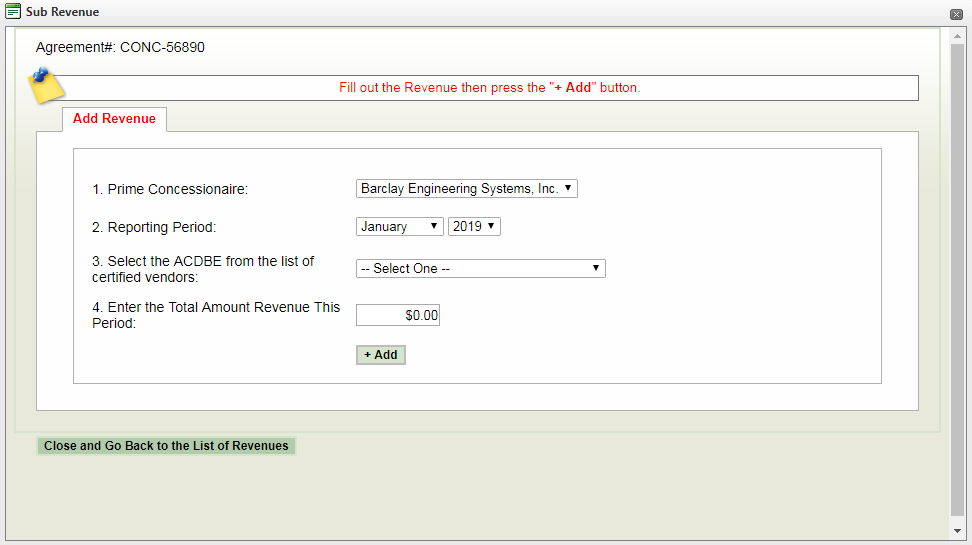
3.From the add pop-up, complete the screen below.
4.Review your entry and confirm.
|
PRISM Compliance Management - Copyright © 2026 Early Morning Software, Inc. |


